Introduction
Hi, I’m Charles, the CTO of Clear. I wanted to share my experience using Rust to server side render parts of the mobile app I work on. First I need to explain how I got into to this situation.
Motivation
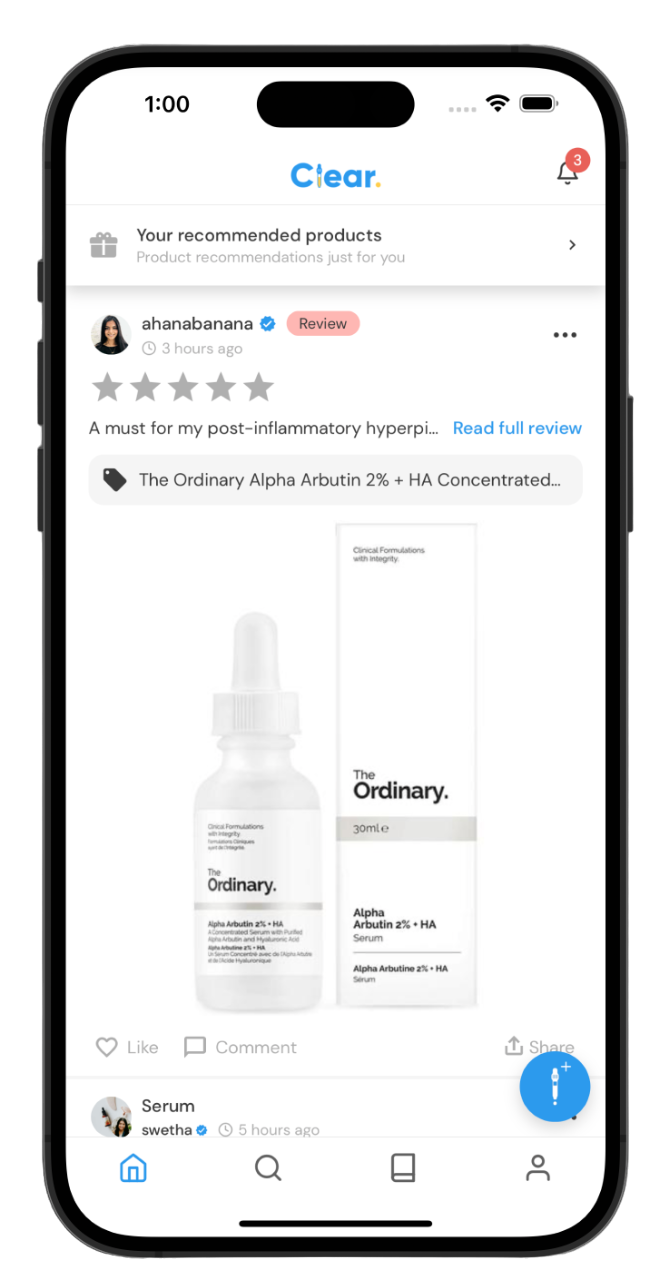
To address the confusion of what Clear is to new users, and to make it easy to discover the features of the app, we needed a proper “Home tab” that provided teasers to the different features of the app. Originally, after new users had finished the signup flow, they were navigated to the “Home tab” which was a list of posts from the community. Given that at most only 5% of users ever engaged with the community features of the app, and that Clear was being marketed as skincare tracker first and foremost, showing only the community posts in the Home tab didn’t make sense. Our “Tracker tab” consisted of showing the user the list of their routines and progress checkins, which wasn’t very engaging so showing that as the first tab wasn’t effective.
| Original Home tab | Original Tracker tab |
|---|---|
 {width=50%} {width=50%} | 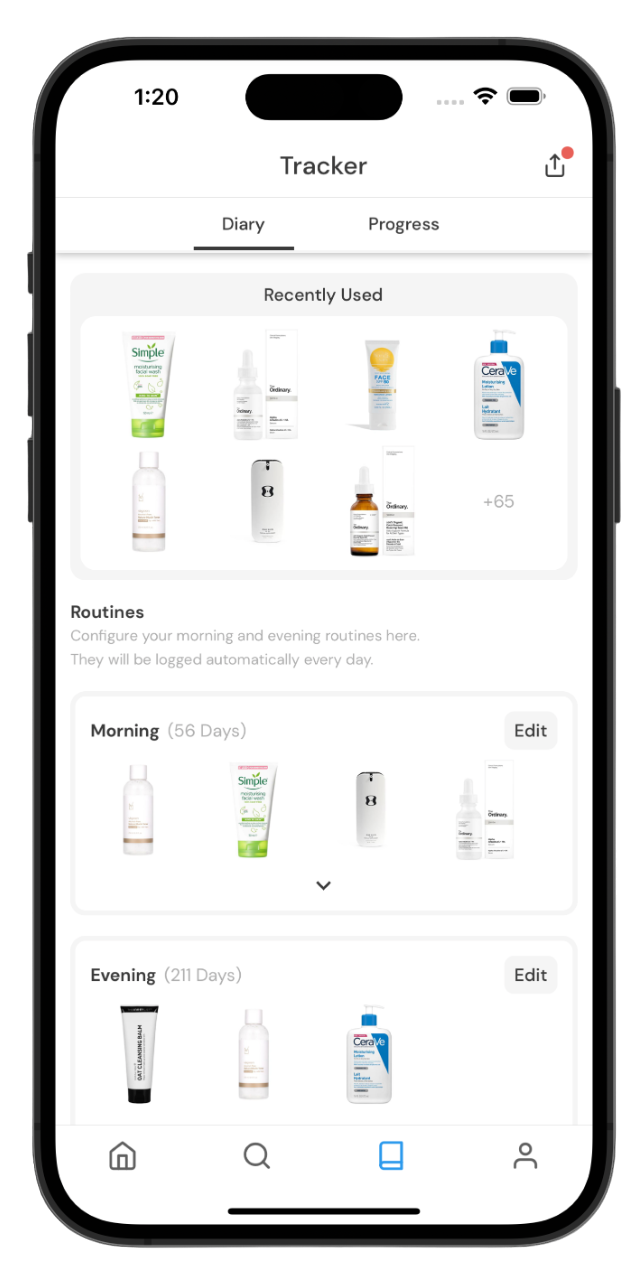 |
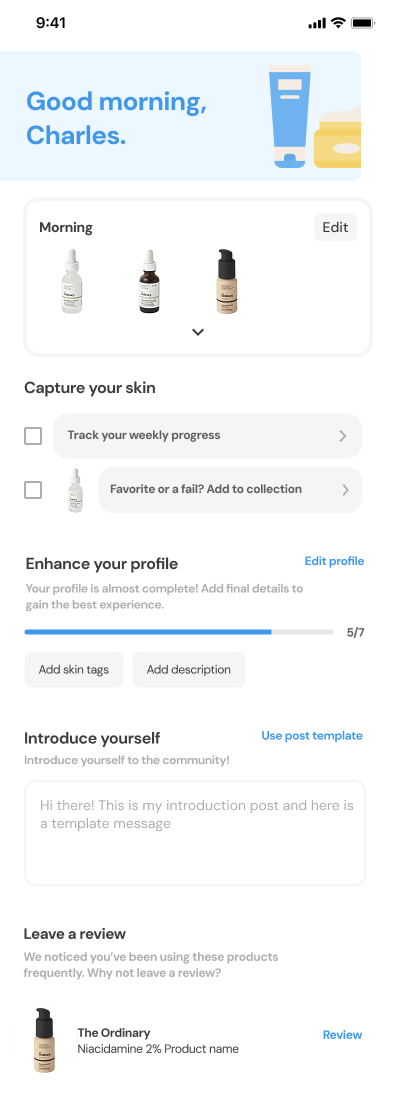
The basic structure for the new Home tab was a heterogenous list of components that adapted to the actions that the user had taken. It was a similar problem to the notification history screen where different types of data are required to render each notification entry.
| Initial Design for the new Home tab | Notification History Screen |
|---|---|
 | 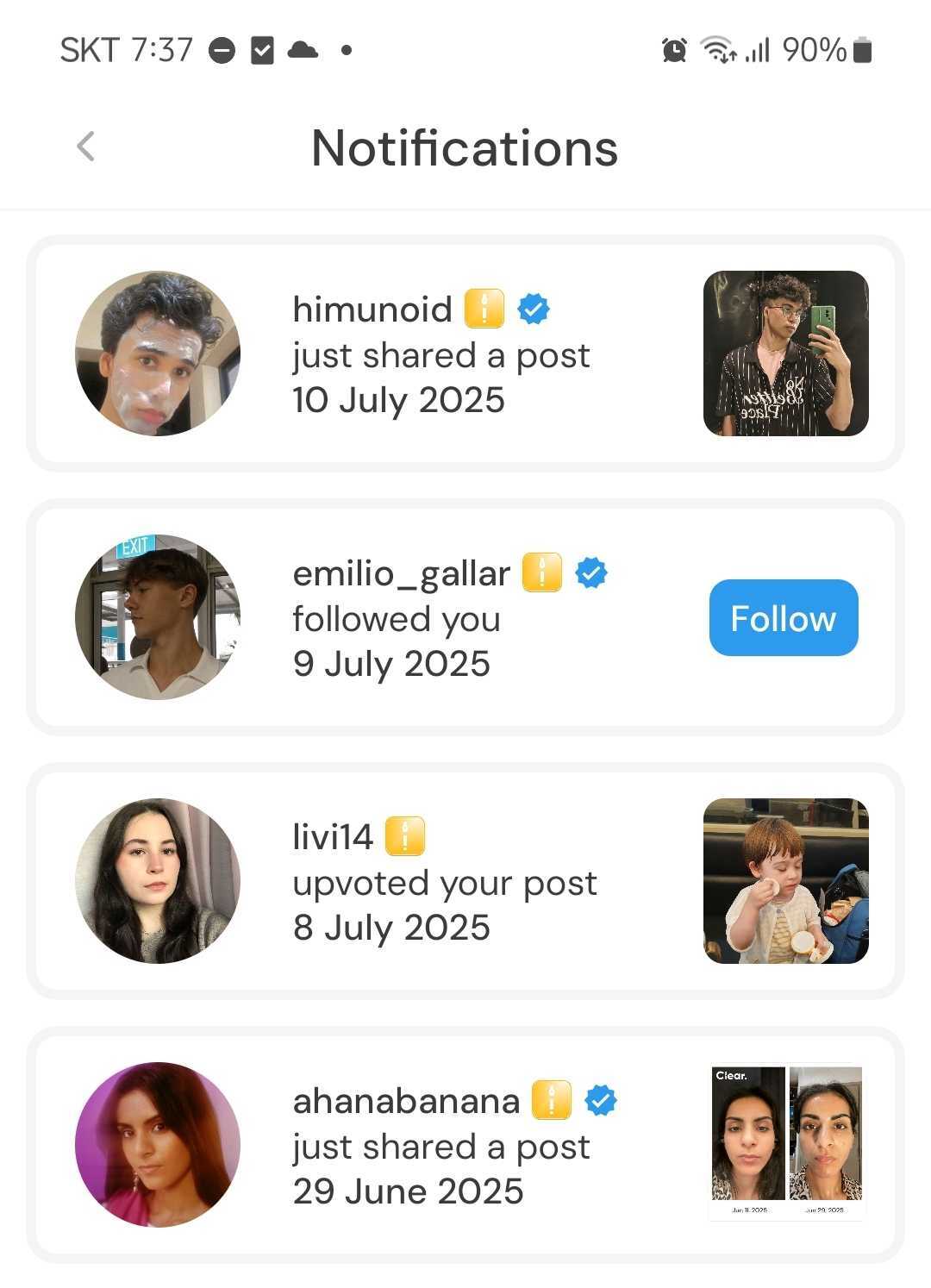 |
We were returning a paginated list of GraphQL unions that the front end code had to know how to render.
When we wanted to add another variant to the GraphQL union type,
we realised that older versions of the app would break.
Even if the client filtered out the unknown union variants,
the GraphQL server would have to know which types the version of the app supported to properly paginate the list
otherwise multiple pages may have to be loaded until compatible variants are found.
We solved this by letting the client pass a list of supported notification types to the scalableConnection field of the Notifications object.
A similar approach could have worked for the Home tab.
GraphQL query to fetch data for notification history
query {
  viewer {
    userNotifications {
      scalableConnection(
        allowedTypes: [
          FOLLOWEES_POST
          FOLLOW
          POST_UPVOTE
        ]
      ) {
        edges {
          node {
            typename: __typename
            ... on FolloweesPost {
              ...SingleNotificationFolloweesPostFragment
            }
            ... on FollowNotification {
              ...SingleNotificationFollowFragment
            }
            ... on PostUpvoteNotification {
              ...SingleNotificationPostUpvoteFragment
            }
          }
        }
      }
    }
  }
}
Why not just extend the existing GraphQL API?
Given that our designer was working with us just an hour a week,
it would have taken a long time to come up with a complete professional design for a “Home tab”.
If I tried to extend the GraphQL API too early whilst the design was evolving,
a lot of development time could have been wasted on getting the back end ready for functionality that may never ship.
It had also become impractical to do full stack development with the GraphQL API due to it taking up to 1 minute to recompile changes to the GraphQL server for a debug build.
I had been working on reducing the hot compilation times by breaking up the original binary crate into smaller crates
and avoiding the juniper macros from directly consuming the database query code within GraphQL field resolvers
which was leading to an explosion in type recursion.
Whilst the steps already made had made using rust-analyzer bearable,
reducing the compilation times to a practical level for cargo watch would have involved refactoring the majority of the back end codebase.
We didn’t have the capacity to commit to this refactor given that I was the only software engineer.
It was time to experiment with an alternative to the current GraphQL server.
For more details on the type recursion problem, read this blog post.
Possible solutions
A dedicated GraphQL server for the Home tab
We could have tried to stay on GraphQL and still avoid the compilation time issue by creating a separate GraphQL server which we did for the admin site. However, relay, the GraphQL client we use, assumes a single GraphQL server for each application and that had already caused issues in correctly typechecking the admin site which used a mixture of both the public and admin GraphQL API (you had to make sure to pass each query to the right GraphQL client and to avoid naming collisions).
A federated GraphQL server
We could have run separate binary servers
that act as one GraphQL endpoint
known as GraphQL federation.
The problem is that juniper doesn’t support federation.
We could have migrated to async-graphql
which supports a lot more GraphQL features,
including federation,
but that requires updating both the public and admin GraphQL servers
(as they both depend on common types deriving juniper traits).
The level of effort for this would be similar to refactoring away the compilation time issues.
Server Side Rendering of React Components
Popular web frameworks like Next.js and Remix exist to server side render React components to HTML using the underlyin react-dom/server API.
There isn’t an equivalent framework for React Native because React components map to native UI components that can’t be represented as hypermedia like websites can with HTML.
Hyperview
I had discovered hyperview after reading the hypermedia systems book.
It’s a React Native client that renders components from a server-generated XML response.
The server requirements can easily be achieved in Rust using axum
or any other HTTP server crate
and askama to render XML templates.
The styling and base elements that the hyperview client expects map directly to React Native
so there’s not a significant learning curve.
If you want to reuse existing React components,
they can be registered as custom elements by the client
but this does introduce versioning issues.
The client just needs to know the endpoint of the hyperview server to get the initial response
which provides href s for button presses and forms.
Entire mobile apps can be developed this way
but for existing apps like Clear where you want to navigate to other screens,
the hyperview client can connect to the existing navigator
and the href s can act as navigation routes.
Given that we weren’t reusing existing complex components for the Home tab,
custom elements weren’t necessary which reduces the complexity.
A JSON API with an OpenAPI spec
I already had experience with generating a typescript client from an OpenAPI spec for a React Native mobile app at a previous company
but hadn’t tried out dropshot to automatically generate OpenAPI specs.
This could have worked well but we would have lost the advantage of only receiving the data that the client requests which GraphQL affords.
Unlike hyperview, fewer aspects on the Home tab are possible to encode naturally through a JSON API
such as which components are deferred from the initial page load
and how unexpected errors are presented.
I was particularly influenced by reading about HATEOAS in the hypermedia systems book. Hypermedia As The Engine Of Application State is an early web concept that hyperview brings new life to for mobile apps as an alternative to the familiar data APIs. The case for using XML instead of JSON to represent UI is made in this blog post.
Implementation
We decided to build the Home tab with hyperview and shipped the first version without needing to reuse existing UI components.
Using the axum and askama worked well to build the hyperview server that served XML responses. The only gotcha was to make sure the “Content-Type” header was “application/vnd.hyperview+xml” otherwise the hyperview client would throw an Error.
Minimal example of hyperview server in Rust
use std::net::SockerAddr;

use askama::Template;
use axum::{
    extract::State,
    http::{HeaderMap, StatusCode},
    routing::get,
    Router,
    Server
};

#[tokio::main]
async fn main() {
    let state = HyperviewState;
    let app = Router::new()
        .route("/hyperview/home", get(home))
        .with_state(state);
    Server::bind(&SockerAddr::from(([0, 0, 0, 0], 2000)))
        .serve(app.into_make_service())
        .await.unwrap();
}

// Can contain database pool etc.
struct HyperviewState;

async fn home(state: HyperviewState) -> Result<(HeaderMap, String), StatusCode> {
    let mut response_headers = HeaderMap::new();
    response_headers.insert(
        "Content-Type",
        "application/vnd.hyperview+xml".parse().unwrap()
    );
    let hxml = HomeDocTemplate {
        message: "hello"
    }.to_string();
    Result::<_, StatusCode>::Ok((response_headers, hxml))
}

#[derive(Template)]
#[template(path = "home/doc.xml")]
struct HomeDocTemplate {
    message: &'static str
}
The XML responses had to be of HXML format.
It was helpful to add a refresh trigger for the main wrapping view so that the UI could be iterated on without having to reload the whole app whilst connecting to a local server.
Minimal HXML
<doc xmlns="https://hyperview.org/hyperview">
  <screen
    id="home"
  >
    <styles>
      <style
        id="GreetingText"
        fontSize="26"
      />
    </styles>
    <body>
      <view
        id="home_view"
        trigger="refresh"
        action="reload"
        scroll="true"
        show-scroll-indicator="false"
        style="HomeView"
      >
        <text style="GreetingText">
          {{ message }}
        </text>
      </view>
    </body>
  </screen>
</doc>
The hyperview client was rendered as a screen within Clear’s existing navigation.
Minimal React Native code
import Hyperview from "hyperview";
const components = []; // Without any custom components

// Used as a screen within "react-navigation"
function Home() {
    return (
        <Hyperview
            components={components}
            entrypointUrl="https://getclearapp.com/hyperview/home"
            fetch={fetch}
        />
    )
}
Lessons learned
The need to register custom elements
Even the initial version of the home tab that we shipped used custom elements to render SVG graphics from the HXML as if it was HTML.
Only <svg> and <path> elements are currently supported which was enough for the graphics created in Figma.
React Native code to register SVG elements.
import Svg, { Path } from "react-native-svg";
import React, { PureComponent } from "react";
import Hyperview, { HyperviewProps } from "@charles-johnson/hyperview";

export default class HyperviewSvg extends PureComponent<HyperviewProps> {
  static namespaceURI = "http://www.w3.org/2000/svg";

  static localName = "svg";

  render() {
    const { element, stylesheets, options, onUpdate } = this.props;
    // Parses the HXML elements attributes.
    // Returns styles and custom props.
    const props = Hyperview.createProps(element, stylesheets, options);
    // Render any HXML sub-elements using Hyperview.
    const children = Hyperview.renderChildren(
      element,
      stylesheets,
      onUpdate,
      options
    );
    return <Svg {...props}>{children}</Svg>;
  }
}

export default class HyperviewSvgPath extends PureComponent<HyperviewProps> {
  static namespaceURI = "http://www.w3.org/2000/svg";

  static localName = "path";

  render() {
    const { element, stylesheets, options } = this.props;
    // Parses the HXML elements attributes.
    // Returns styles and custom props.
    const props = Hyperview.createProps(element, stylesheets, options);
    return <Path {...props} />;
  }
}
HyperviewSvg and HyperviewSvgPath need to be included in the components prop of Hyperview elements
We also did eventually start registering custom elements for later versions of the app which we had to avoid including in responses for older versions. This allowed us to reuse existing complex UI components and new UI components that could be built by other team members that only needed to be familiar with React.
We made sure that the app sent a User-Agent HTTP header that includes the version of the app so that the server can check for compatibility. This has resulted in logic spread around the codebase checking for a minimum version for each custom element without any automated validation that we do for changes in the GraphQL API. In practice, this hasn’t resulted in production bugs as the current version of app has always been manually tested against hyperview changes in a review environment.
Example of version check on the server
async fn home(request_headers: HeaderMap, state: HyperviewState) -> Result<(HeaderMap, String), StatusCode> {
    let custom_section_header = is_compatible_with_version(&request_headers, 1, 52);
    let mut response_headers = HeaderMap::new();
    response_headers.insert(
        "Content-Type",
        "application/vnd.hyperview+xml".parse().unwrap()
    );
    let hxml = HomeDocTemplate {
        custom_section_header,
        message: "hello"
    }.to_string();
    Result::<_, StatusCode>::Ok((response_headers, hxml))
}

#[derive(Template)]
#[template(path = "home/doc.xml")]
struct HomeDocTemplate {
    custom_section_header: bool,
    message: &'static str
}
In order to render these custom products,
the XML templates need to declare a namespace that matches the namespaceURI used in the React code.
Example of conditionally rendering custom element using namespace prefix
<doc xmlns="https://hyperview.org/hyperview" xmlns:clear="https://getclearapp.com/hyperview">
  <screen
    id="home"
  >
    <styles>
      <style
        id="GreetingText"
        fontSize="26"
      />
    </styles>
    <body>
      <view
        id="home_view"
        trigger="refresh"
        action="reload"
        scroll="true"
        show-scroll-indicator="false"
        style="HomeView"
      >
        {% if custom_section_header %}
        <clear:section-header
          title="{{ message }}"
        />
        {% else %}
        <text style="GreetingText">
          {{ message }}
        </text>
        {% endif %}
      </view>
    </body>
  </screen>
</doc>
The need to fork the official hyperview client
-
The latest version of the React Native hyperview client at the time was v0.72.3 which was built for an older version of React Native (v0.67) and React (v17) which needed updating in this commit.
-
The typescript declaration files weren’t available for the Clear app to use. This was fixed in this commit.
-
Due to
@react-native-picker/picker’s lack of support (at the time) for React Native 0.72, thepicker-fieldelement was removed in this commit because we didn’t need it. -
The official hyperview client only allowed GET and POST HTTP methods but there wasn’t any real reason for this restriction so this commit allowed PUT, PATCH and DELETE methods as well. We could then serve semantically appropriate HTTP requests.
-
Pull-to-refresh can be implemented with hyperview easily with the
refreshtrigger but it ignored theshows-scroll-indicatorattribute so this needed to be fixed in this commit. This fixed was applied upstream after being reported in this issue -
The
visibletrigger is useful for lazy loading lists, however, inconsistent behaviour was observed on Android which was reported in this issue and fixed in this commit
Hijacking hyperview’s event system
In order to keep the Home tab up to date after user interaction outside of hyperview, such as creating a routine or progress check-in, events needed to dispatched via Javascript instead of HXML attributes.
Example of dispatch via Javascript
import { dispatch } from "@charles-johnson/hyperview/lib/services/events"

dispatch("routine-update");
Example of HXML that updates on events
<view
  href="/hyperview/home?only=current_routine"
  trigger="on-event"
  event-name="routine-update"
  action="replace"
  xmlns="https://hyperview.org/hyperview"
  xmlns:clear="https://getclearapp.com/hyperview"
>
  <clear:routine-block routine="{{ routine }}" />
</view>
Connecting to an external navigation took some work
We had to come up with a way to parse the href attributes for elements with navigation actions to map to the existing navigation routes.
The navigation routes and parameters can be validated by zod so that errors can be caught as soon as possible.
We do now have to be careful, however, of breaking changes to the navigation system
i.e. removing or renaming a navigation route or parameter.
This isn’t something that has caused errors in production
but is something that needs communicating to other team members that work on the front end
that may be not be aware of the hyperview system.
The hyperview client was forked from v0.72.3 to allow navigating to a screen without specifying any navigation parameters in this commit.
After reporting this issue,
the official hyperview project removed support for external navigation as mentioned in this blog in favour of their own internal navigation
which is more useful for whole apps that are built on top of hyperview.
Validation of custom element attributes
We mostly serialised custom element data to a JSON string that is used as the value of a single attribute of a custom element.
This attribute is then parsed as a Javascript object and validated by zod at runtime.
This allows us to catch type errors quickly
but we don’t have a way of automatically syncing the zod parsers with the Rust types that are serialised into the HXML response.
Typical validation when registering custom elements:
class HyperviewRoutineBlock extends PureComponent<HyperviewProps> {
    static namespaceURI = "https://getclearapp.com/hyperview"

    static localName = "routine-block"

    render() {
        const { element, stylesheets, options } = this.props;
        // Parses the HXML elements attributes.
        // Returns styles and custom props.
        const props = Hyperview.createProps(element, stylesheets, options);
      try {
        if (!("routine" in props)) {
          throw new Error("routine-block missing required routine attribute");
        }
        if (typeof props.routine !== "string") {
          throw new Error(
            `routine-block routine attribute has type "${typeof props.routine}", not "string"`
          );
        }
        const routine = routineSchema.parse(JSON.parse(props.routine));
        return (
          <RoutineBlock routine={routine} />
        );
      } catch (e) {
          /// TODO: Track error
          null
      }

    }
}
routineSchema is a zod schema and the routine attribute is serialised into JSON from the Rust code
use std::fmt::{Formatter, Result};

struct Routine {
    products: Vec<Product> // Product implements Serialize
    // other fields that might require special serialization
}

impl Display for Routine {
    fn fmt(&self, f: &mut Formatter<'_>) -> Result {
        let mut json = json!({
            "products": self.products,
        });
        write!(f, "{json}")
    }
}
Validating XML against HXML schema
In order to help correctly construct XML that follows the HXML schema,
configuring the VSCode XML extension to use .xsd files found here was helpful in avoiding typos.
However,
due to the presence of askama template syntax,
there were too many false positives to be used as a robust CI job.